GSTBilling & accounting for Indian businesses

The simplest way to manage GST invoices, quotations, proforma invoices, purchase orders, payments, expenses, e-way bills and GST returns.

Create invoices and quotations, track what you’re owed and what you owe, record expenses and stay ahead of GSTR-1 and GSTR-3B due dates — all from your browser.

✓ Runs in your browser✓ GSTR-1 & GSTR-3B tracking✓ Light & dark mode
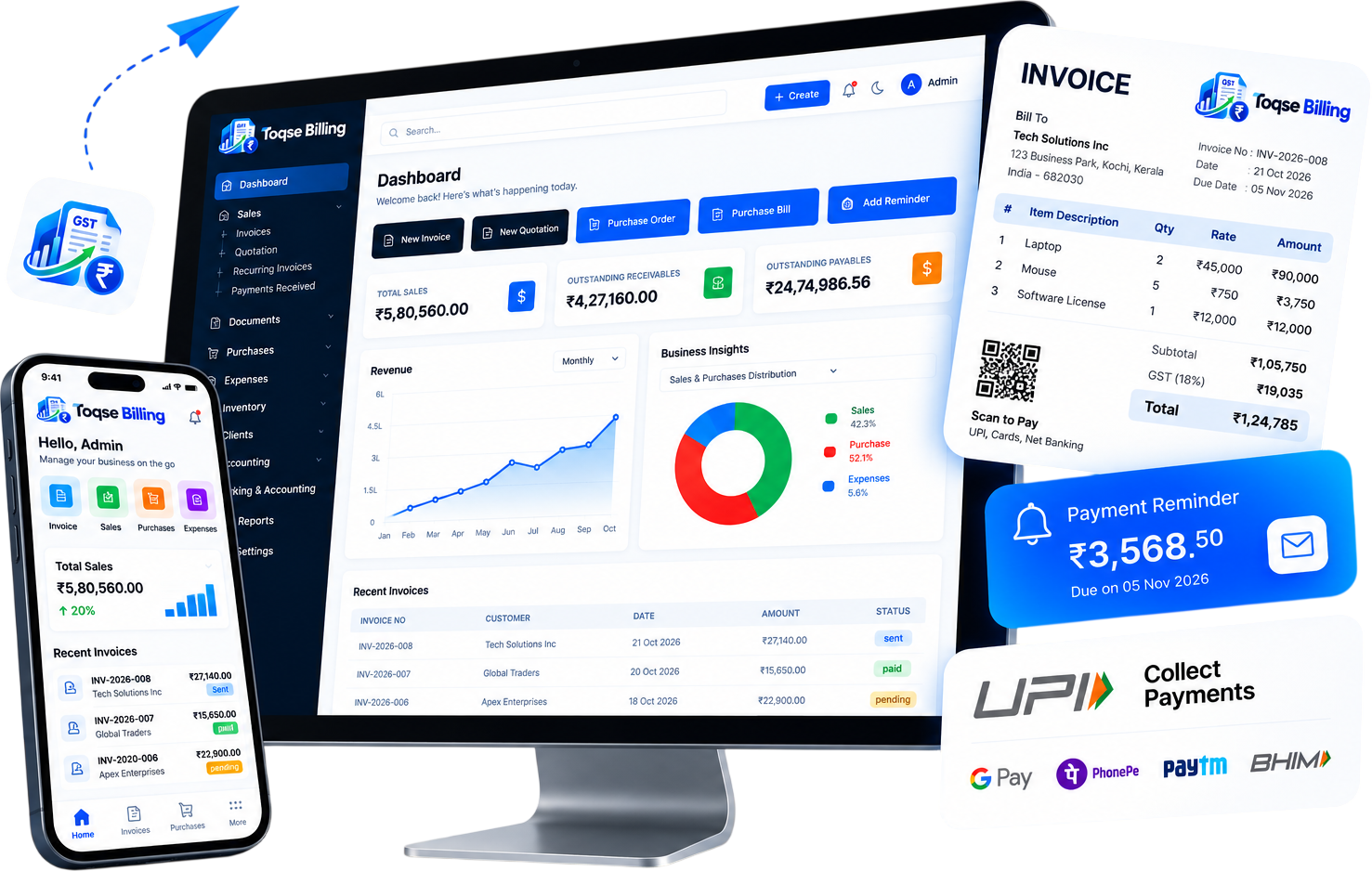
Toqse Billing on desktop and mobile: dashboard, GST invoice with QR code, payment reminder and UPI payments
All-in-one

Everything in one sidebar.

Every part of your billing and accounting, one click away — no extra tools to install or juggle.

11Modules in one app
8One-click quick actions
4Live money totals
0Installs needed
  • DashboardTotals, charts & GST dates
  • SalesInvoices, quotes & payments
  • DocumentsYour business paperwork
  • PurchasesOrders, bills & payments made
  • ExpensesDay-to-day costs
  • InventoryProducts & stock
  • ClientsCustomer records
  • ComplianceGSTR-1 & GSTR-3B
  • Banking & AccountingBank & accounting records
  • ReportsBusiness performance
  • SettingsBusiness details & preferences
  • 11 modulesSee all features
Features

Know where every rupee stands.

Spend less time on paperwork and more on your business — billing, purchases, expenses and GST, all on one screen.

  • GST compliance, end to endGSTR-1, GSTR-3B and GSTR-9 reports, e-way bills and TDS/TCS — all in one compliance hub.
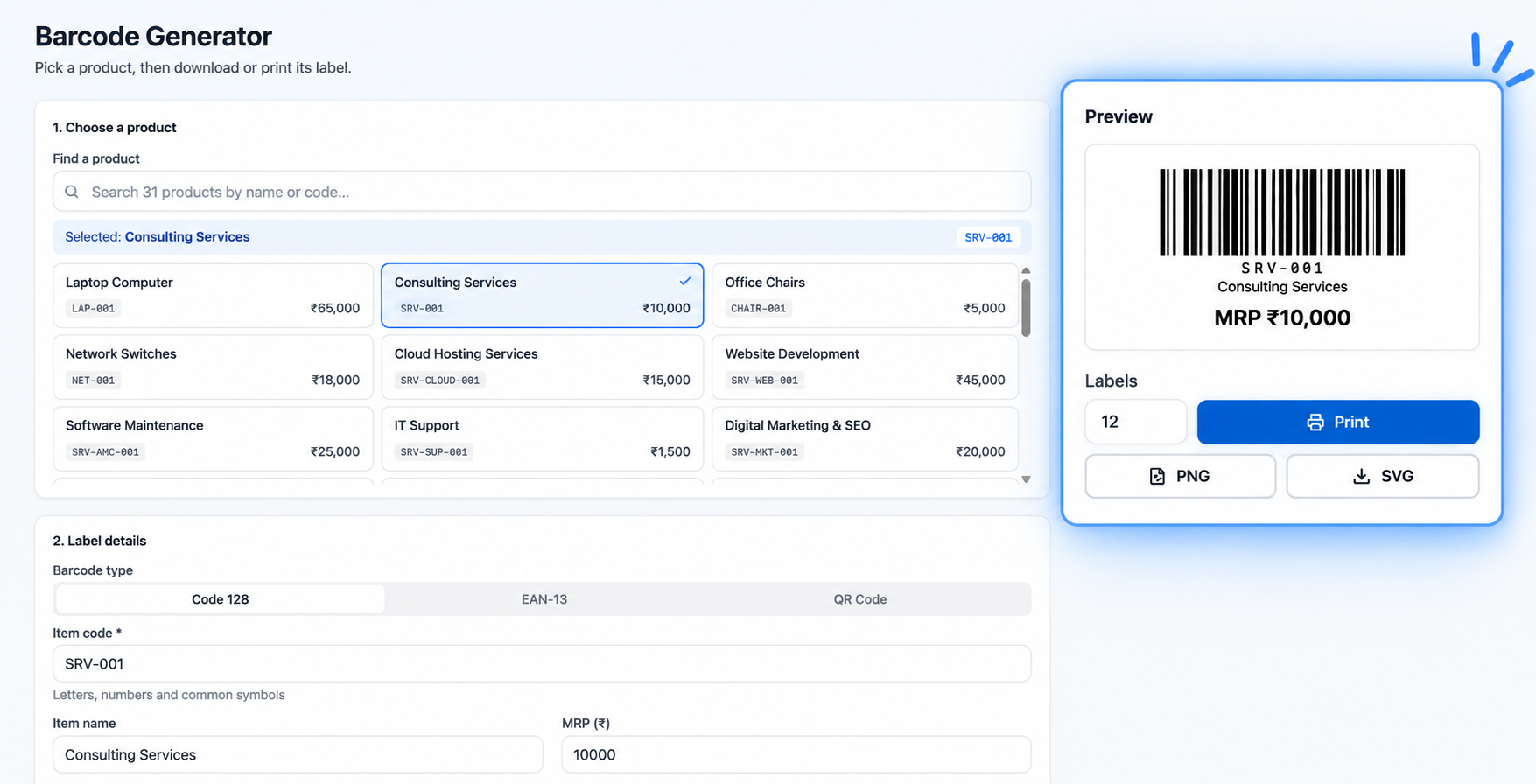
  • Barcode & QR codes for productsGenerate Code128, EAN-13 or QR codes for every item and print labels, ready to scan at billing.
  • Complete accountingProfit & loss, balance sheet, journal ledger and bank reconciliation — no separate software.
  • Customer self-service portalYour customers sign in to view their invoices, estimates and payments anytime.
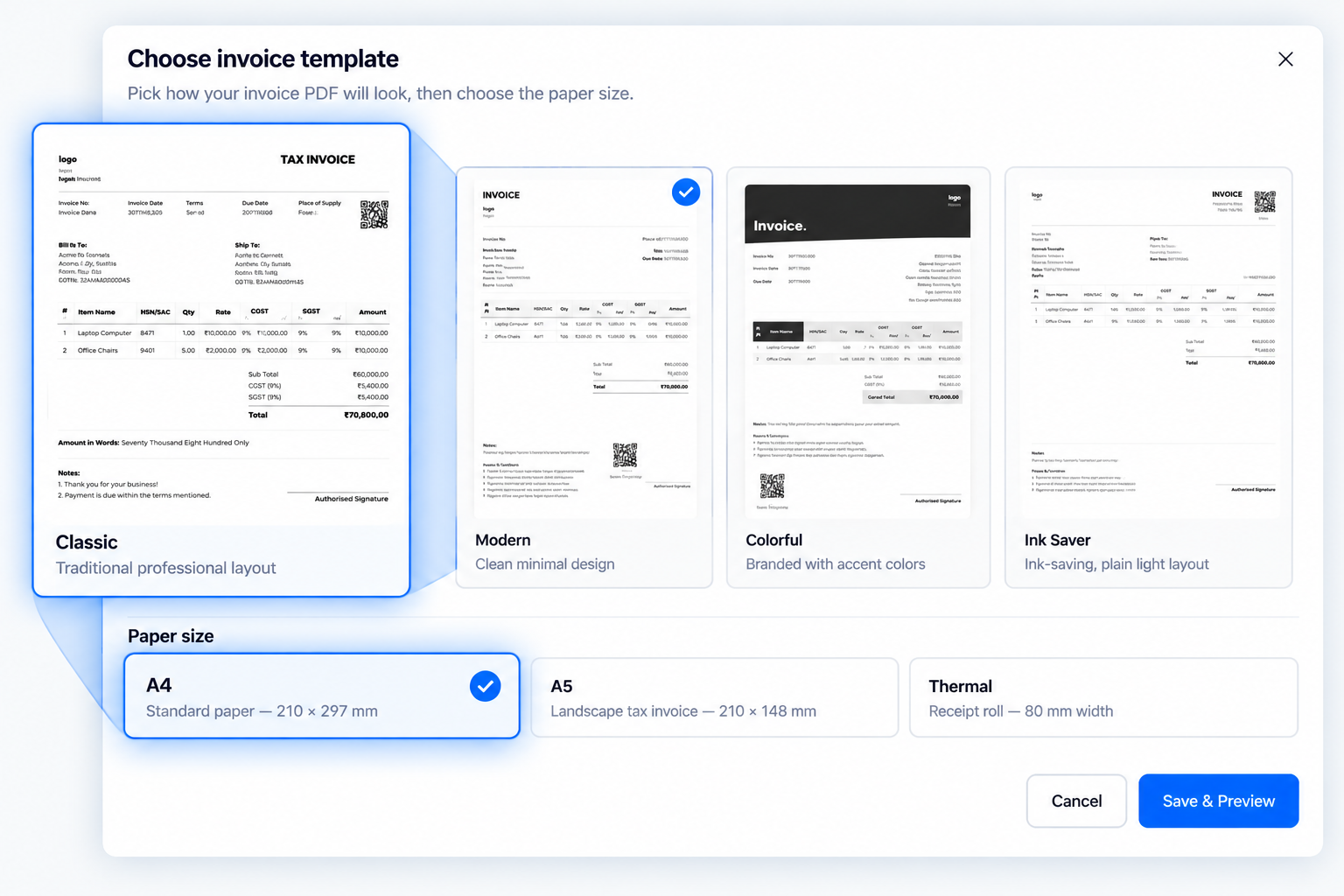
  • Print-ready invoice templatesPick the format that fits your printer — A4, A5 or thermal receipt.
  • Customise with live previewAdd your logo, colours and fields, and see the invoice update before you print.
Choose invoice template dialog: Classic, Modern, Colorful and Ink Saver templates with A4, A5 and Thermal paper sizes, and a Save & Preview buttonBarcode Generator: choose a product, pick Code 128, EAN-13 or QR Code, preview the label and print or download it as PNG or SVG
How to use · 4 steps

From sign-in to your first invoice.

Most businesses are set up and billing in a few minutes.

  1. 01

    Sign in & set up

    Open the app in your browser and add your business details in Settings.

    Settings
  2. 02

    Add clients & items

    Build your customer list in Clients and your products in Inventory.

    Clients · Inventory
  3. 03

    Pick a template & create

    Choose a template and paper size (A4, A5 or thermal), preview it, then create your invoice.

    Choose template › Preview
  4. 04

    Track & file

    Record Payment In / Out, watch your totals and GST return dates.

    Dashboard
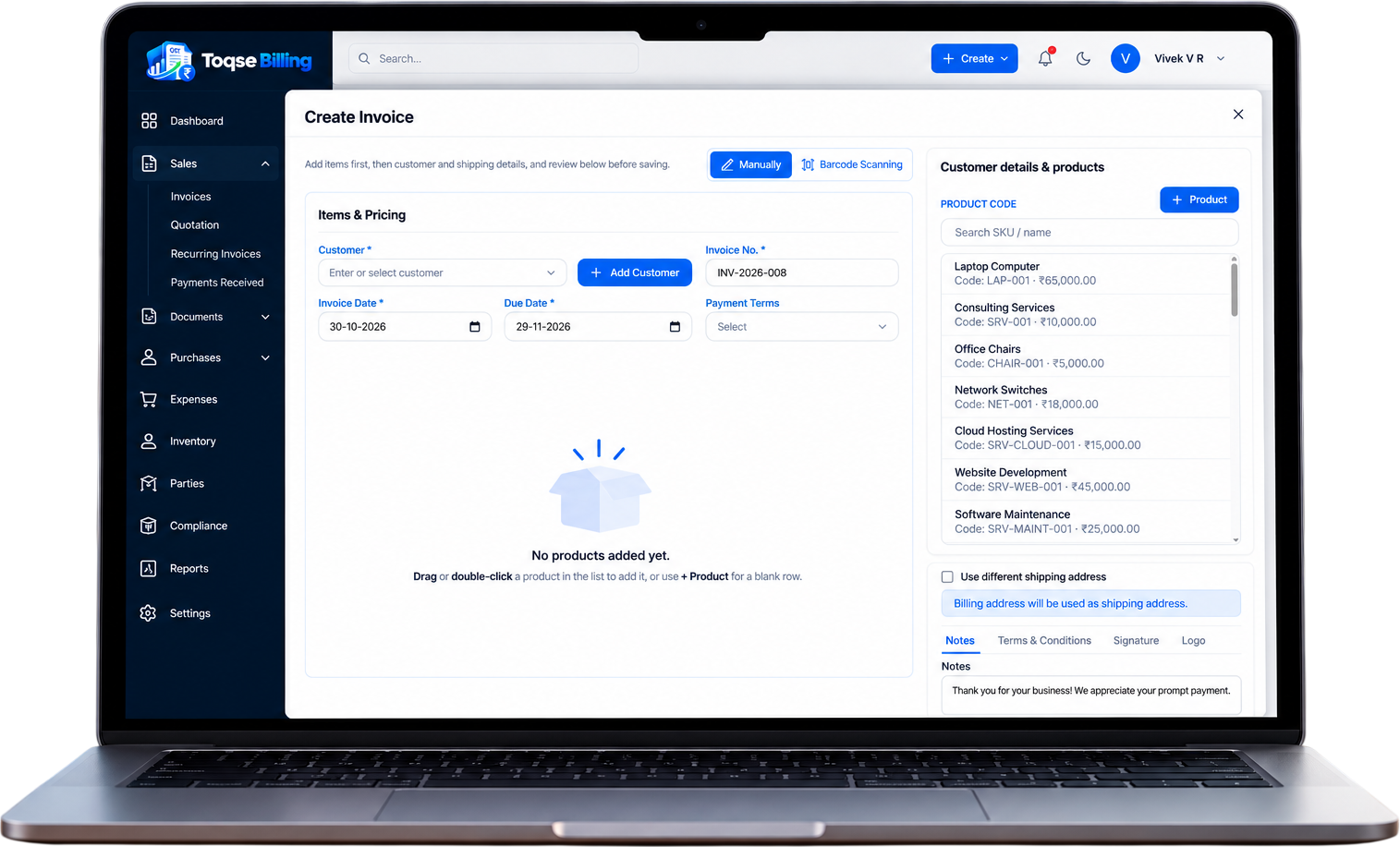
Toqse Billing Create Invoice screen on a laptop: customer, invoice number, dates, payment terms and a product list, with Manual and Barcode Scanning modes
Specifications

Nothing to install. Just open and bill.

A web app for your PC or laptop and a separate Android app for your phone — and it works both online and offline.

  • PlatformWeb app — nothing to install
  • Proforma invoiceQuote advance payments before the final bill
  • Tax engineCGST/SGST, IGST & CESS · HSN/SAC codes
  • GST complianceGSTR-1, 3B & 9 · e-way bills · TDS/TCS
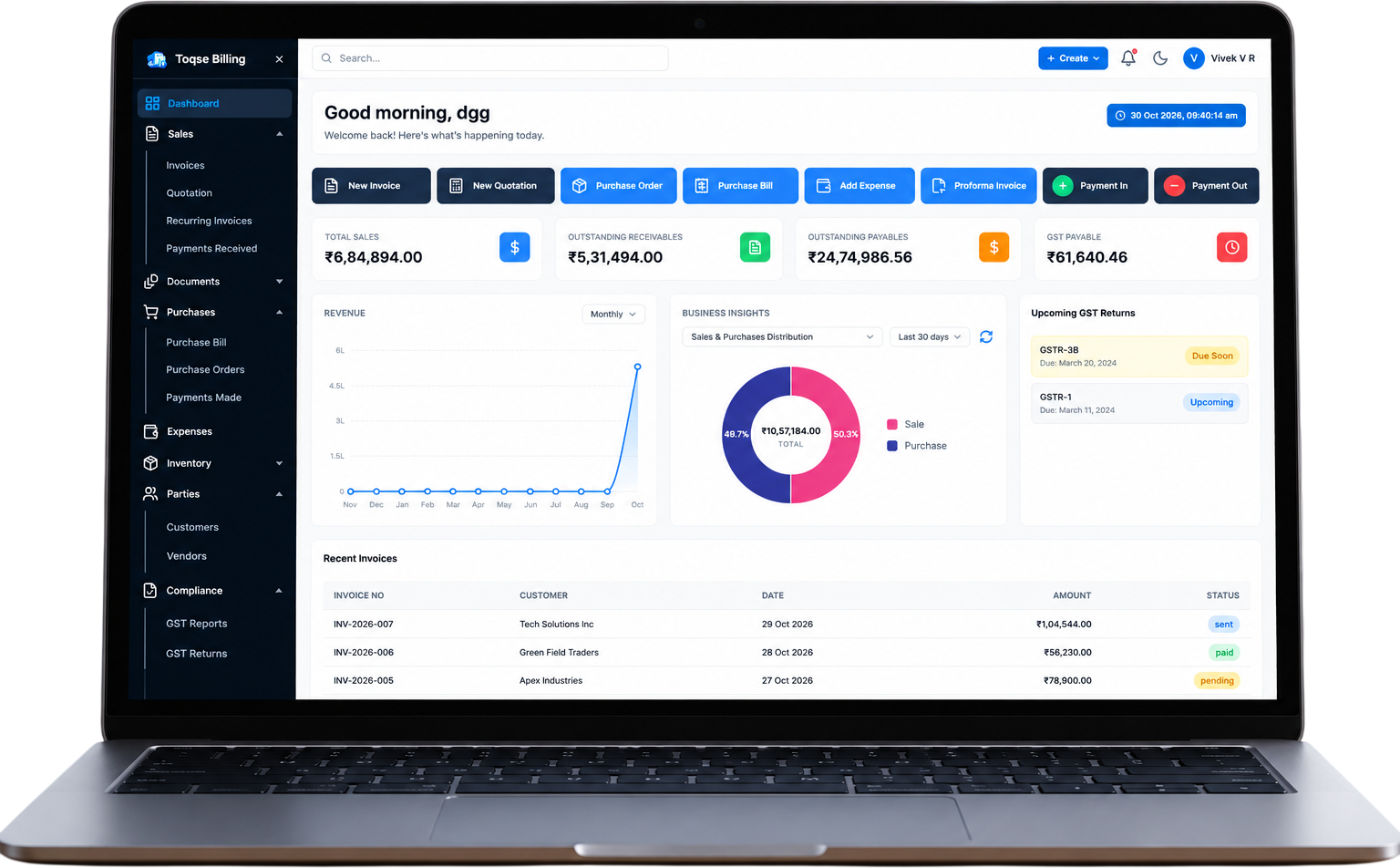
GST Billing dashboard on a laptop: quick actions, money totals, revenue chart, business insights, upcoming GST returns and recent invoices
0installs
needed
₹ lakh formattingLight & dark modeFull specifications →
  • Print formatsA4, A5 & 80 mm thermal · QR on invoices
  • ExportsPDF documents · CSV reports · bulk upload
  • Team & officesMultiple offices · admin, accountant & viewer roles
  • Data & securitySecure token sign-in · PostgreSQL database
Documents you can create

12 business documents. One app.

Every bill, quote and voucher your business sends — GST-ready and printable as A4, A5 or thermal.

SalesPurchasesCompliance & stock
  • Sales

    Tax invoice

    GST invoice with CGST/SGST or IGST, HSN/SAC and a QR code.

  • Sales

    Quotation / Estimate

    Send a clear price quote before the sale.

  • Sales

    Proforma invoice

    Ask for an advance before you issue the final bill.

  • Sales

    Recurring invoice

    Bills that repeat for rent, retainers and AMC contracts.

  • Sales

    Payment receipt

    Record money received and keep receivables accurate.

  • Purchases

    Purchase order

    Order stock from suppliers before the goods arrive.

  • Purchases

    Purchase bill

    Enter supplier bills so payables are always up to date.

  • Purchases

    Payment voucher

    Record payments made to suppliers and vendors.

  • Purchases

    Expense

    Log day-to-day business costs in one click.

  • Compliance & stock

    E-way bill

    Create and track e-way bills for goods on the move.

  • Compliance & stock

    Stock adjustment

    Correct stock for damage, loss or recounts.

  • Compliance & stock

    Invoice annexure

    Attach detailed tables and terms to any invoice.

Why GST Billing

More than a billing app. See the difference.

How Toqse Billing compares with other billing software.

FeatureBest choiceToqse BillingOther billing software
No install — runs in any browserOften needs installing
Easy to use — create a bill in secondsLearning curve
GST invoices with CGST/SGST, IGST & CESS
GSTR-1, 3B & 9 reportsOften an add-on
E-way bills & TDS/TCSOften an add-on
A4, A5 & thermal invoice templatesLimited
Barcode & QR labels for productsLimited
Customer self-service portal
Multiple offices & user rolesExtra licence
P&L, balance sheet & bank reconciliation
UpdatesAutomaticManual updates
Pricing

Simple plans that grow with you.

Pick the plan that fits your business today. Upgrade any time — no installs, no hidden fees.

Starter

For shops and freelancers getting started with GST billing.

₹249/ month

Billed ₹2,990 yearly · + GST

Get started →
  • 1 office · 1 user
  • GST invoices & quotations
  • Customers, items & inventory
  • A4, A5 & thermal templates
  • Expenses & payments in / out
  • GSTR-1 & GSTR-3B reports
  • Email support

Enterprise

For multi-branch businesses that need more control.

Custom

Priced for your branches and team size.

Talk to sales →
  • Everything in Business, plus:
  • Unlimited offices & users
  • Custom invoice templates & annexures
  • Bulk data upload & migration help
  • Onboarding & staff training
  • Dedicated account manager
Testimonials

What businesses say about GST Billing.

[4.8]★★★★★Average from [number] reviews
★★★★★Retail
“[Real customer quote — e.g. how the GST returns panel keeps them on time.]”
AB[Customer name][Business, City]
★★★★★Services
“[Real customer quote — e.g. how recurring invoices handle monthly retainers.]”
CD[Customer name][Business, City]
★★★★★Wholesale
“[Real customer quote — e.g. how receivables tracking improved collections.]”
EF[Customer name][Business, City]
★★★★★Trading
“[Real customer quote — e.g. how purchase bills keep payables accurate.]”
GH[Customer name][Business, City]
★★★★★Retail
“[Real customer quote — e.g. how thermal receipts speed up the counter.]”
IJ[Customer name][Business, City]
★★★★★Services
“[Real customer quote — e.g. how quotations help them win new clients.]”
KL[Customer name][Business, City]
★★★★★Manufacturing
“[Real customer quote — e.g. how barcode labels simplified stock.]”
MN[Customer name][Business, City]
★★★★★Wholesale
“[Real customer quote — e.g. how quick actions save time every day.]”
OP[Customer name][Business, City]
FAQ

Questions, answered.

Everything you need to know before you start billing with GST Billing.

Still have questions?Our team is happy to help.
  • Call[+91 XXXXX XXXXX]
  • WhatsApp[number]
  • Email[support@yourdomain.com]
Contact support →
01Do I need to install anything?

No. GST Billing runs in your web browser — Chrome, Edge, Firefox or Safari — on your computer or laptop, and updates automatically. On your phone, use the Android app — both work online and offline.

02Can I try it before I pay?

Yes. Open the live demo and explore every module with sample data.

03Which GST returns and compliance does it cover?

GSTR-1, GSTR-3B and GSTR-9 under Compliance › GST Returns, plus GST reports, e-way bills and TDS/TCS.

04Can I print bills on a thermal printer?

Yes. Every invoice can be printed as A4, A5 or an 80 mm thermal receipt, using the Classic, Modern, Colorful or Ink Saver template.

05Can I manage more than one branch?

Yes. Add your head office and branches during setup or under Settings › Offices & Branches, and choose which office each bill is created for.

06Can my accountant or staff use it too?

Yes. Add team members with admin, accountant or viewer roles so everyone sees only what they need.

07Can my customers see their invoices?

Yes. The customer portal lets your customers sign in to view their invoices, estimates and payments.

08How do I get support?

Call or WhatsApp [+91 XXXXX XXXXX], email [support@yourdomain.com], or send us a message from the Support page.